Easy 3D Adding Puzzles: A KDP Practice File Review
Beyond the Black and White Grid: Understanding the Puzzle's Core
For anyone looking to dive into the world of creating puzzle books for Amazon KDP, the initial steps can feel daunting. You have the idea, but the execution—designing puzzles, formatting interiors, and understanding the technical specifications—requires a practical starting point. This is where a resource like the Easy 3D Adding Puzzles KDP Practice File becomes invaluable. It’s not a final, upload-ready interior, but rather a foundational toolkit designed to teach you the craft.
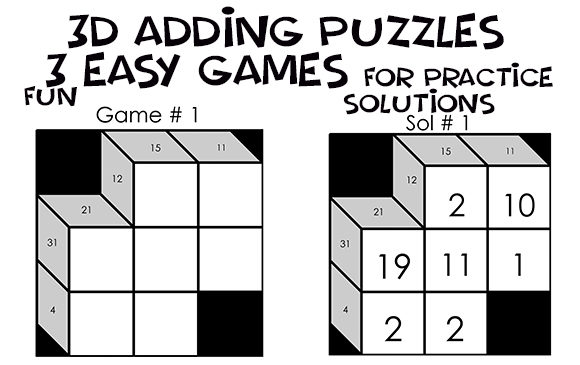
At its heart, this file contains practice games based on Kakuro, often called "Cross Sums." Imagine a crossword puzzle's grid, but instead of letters, you're working with numbers. The playing field is a mix of filled and empty cells. Certain black cells feature a diagonal slash, with numbers in the top right ("across" clue) and bottom left ("down" clue). Your task is to fill the empty cells with digits that sum up to the clue, without repeating any number within a single run. It’s a pure logic puzzle that feels deeply satisfying to solve.
The practice file provides three of these puzzles in a clean, 8.5 x 8.5 inch JPG format with a crisp white background. The solutions are kept manageable, with numbers ranging from 1 to 20. This simplicity is intentional. It allows you, the creator, to focus on the puzzle's structure and your layout process without getting bogged down in extreme complexity. The file includes a PowerPoint (.pptx) version, which is where the real learning happens.
Practical Applications: From Practice File to Polished Product
The true value of this KDP practice file isn't just in the puzzles themselves, but in the workflow it teaches. As a design asset, it’s a sandbox for experimentation. You can open the PowerPoint file and practice fundamental layout tasks. Need to renumber a puzzle for a different section of your book? You can do that. Want to see how a different typeface affects the grid's clarity? You can change the font via the Master Slide, though it notes you may need to manually adjust the number positioning afterward—a common real-world design hurdle.
This hands-on experience is critical for anyone creating low content books or no content books. It moves you from theory to practice. You learn how to manage layers in a design file, how to ensure consistent spacing for readability, and how to prepare your interiors. The 8.5 x 8.5 inch size is a popular dimension for puzzle books, and working with it directly gives you a feel for the final printed product's scale.
Consider how this practice translates to other projects. The logical, grid-based structure of Kakuro puzzles shares a visual language with editorial design and web design layouts. Mastering the alignment of numbers in a tight grid hones your eye for detail, a skill directly applicable to creating balanced social media graphics or organized packaging design. The discipline required to ensure every clue and solution is perfectly positioned builds a foundation of precision essential for professional brand identity work.
Evaluating Fit and Building Your Design Toolkit
When you download a resource like the Easy 3D Adding Puzzles KDP Practice File, it’s wise to approach it as you would a new font or typeface. You need to evaluate its fit for your specific project. Here’s a practical approach:
- Test the Workflow: Open the .pptx file. Try renumbering a puzzle. Change the font to a sans serif font like Arial and a serif font like Times New Roman. Observe how each affects the grid's feel. Does the modern typography of a sans serif make it feel more clinical? Does a serif add a classic touch? This is your chance to experiment with font pairing in a low-stakes environment.
- Assess the Scalability: The file is a practice piece. Your job is to take this structure and build a complete interior. This means designing a cover, creating a consistent page numbering system, adding instructional pages, and finally, exporting the entire layout as a print-ready PDF. This practice file is your first chapter, not the whole book.
- Consider the Audience: Puzzle book buyers are looking for clear, unambiguous challenges. The white background and straightforward grid of this file prioritize readability over flashy design. This is a good lesson in visual hierarchy—the puzzle itself must be the hero. Any decorative elements you add later should support, not compete with, the core content.
- Think Beyond the Immediate: The problem-solving skills you build here are transferable. Designing a clear puzzle is like designing a clear user interface or a compelling logo design. It requires understanding how a user interacts with visual information, a cornerstone of effective marketing and content creation.
Ultimately, this practice file is less about the specific puzzles and more about demystifying the creation process. It provides a tangible starting point, allowing you to build confidence and develop a repeatable system for producing professional-quality puzzle interiors. By engaging with it practically, you’re not just learning to make one type of puzzle; you’re refining the core design and production skills that underpin successful publishing and creative projects of all kinds. It’s a foundational tool for the entrepreneur or craenter serious about building a viable product line.