Strategic Goal Planning for the New Year: A Visual System
The start of a new year brings a familiar challenge: turning vague aspirations into tangible outcomes. While motivation is high in January, most goal-setting efforts fade by February because they lack structure and a clear visual roadmap. Effective goal planning is less about sheer willpower and more about building a system that makes progress inevitable. It’s about creating a dedicated space to define your objectives, break them down into actionable steps, and track your journey throughout the year. This is where a thoughtfully designed planner transitions from a nice-to-have tool to a critical asset for personal and professional growth.
Visualizing your goals is a powerful psychological tactic. When you write down a goal, you engage a different part of your brain than when you simply think about it. A dedicated New Year Goals Printable or planner template takes this further by providing a structured framework. This structure prevents the overwhelm of a blank page and guides you through defining what you want to achieve, why it matters, and how you’ll get there. The right design isn’t just about aesthetics; it’s about creating a functional tool that aligns with your thinking process and keeps you engaged month after month.
The Anatomy of an Effective Yearly Planner
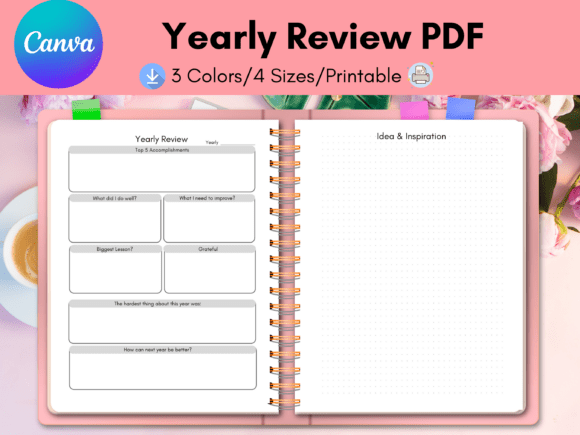
A truly functional yearly planner goes beyond monthly calendars. It requires distinct sections that serve different purposes in the goal-achievement cycle. An ideal system includes space for a high-level annual vision, quarterly breakdowns, and monthly or weekly action plans. This layered approach ensures you connect your daily tasks to your overarching annual objectives. The visual hierarchy is crucial here; clear headings, ample writing space, and intuitive organization reduce friction and make the planning process something you look forward to rather than avoid.
Consider the difference between a cluttered, text-heavy page and a clean, well-spaced layout. The latter respects your cognitive load. It uses design principles like proximity and alignment to group related information, making it easier to scan and update. This is where modern typography plays a silent but significant role. A clear, readable sans serif font for body text ensures your notes are legible, while a complementary display font for headings can inject personality and make key sections stand out. The overall style should feel professional yet personal—serious enough for business goals but flexible enough for personal projects.
Introducing a Game-Changing Planning Template
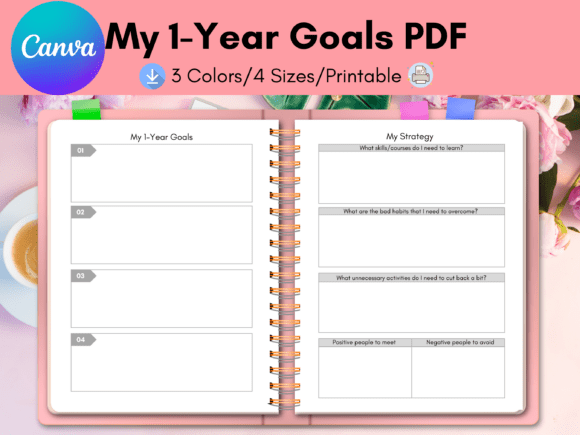
For coaches, creators, and entrepreneurs, sharing a planning system with your audience or clients can be a tremendous value-add. However, designing a multi-page planner from scratch is time-consuming and requires specific design skills. This is the problem a resource like the Two-Page 1 Year Goals Planner Canva Template is designed to solve. It’s a pre-template, a foundational design asset built in Canva that you can fully customize to become your own branded product.
This type of template is a practical solution for several reasons. First, it leverages Canva’s accessible interface, meaning you don’t need advanced software like Adobe InDesign. The free version of Canva is sufficient for all basic customizations. Second, it’s built with commercial use in mind. You can add your logo, adjust the color palette to match your brand identity, swap the font for one that reflects your voice, and modify icons or layout elements. The included source file, typically in Letter Size, acts as a master document from which you can generate multiple sizes—A4, A5, and specialty sizes like the Happy Planner Classic—to meet diverse customer needs.
Practical Applications Across Industries
The utility of such a customizable planner spans numerous fields. A finance coach could tailor it to include sections for budgeting and investment tracking alongside goal setting. A business coach might focus on KPIs and quarterly milestones. For content creators and bloggers, it can integrate content calendars and project pipelines. Etsy and Shopify store owners can use it to plan product launches, marketing campaigns, and inventory management. The key is that the template provides the structural backbone, freeing you to focus on the content that provides unique value to your specific audience.
From a brand strategy perspective, offering a beautifully designed, functional planner strengthens your professional image. It demonstrates expertise in organization and planning, which is a direct reflection of the value you offer as a coach or consultant. It becomes a tangible piece of your brand identity, used repeatedly by your clients or audience throughout the year, keeping your brand top-of-mind.
Customizing Your Planner: A Step-by-Step Approach
Once you have the template, the customization process in Canva is straightforward. Start by uploading your brand assets: your logo, a specific color palette (use hex codes for precision), and any custom fonts you’ve licensed. Apply these elements consistently across all pages. Next, review the text hierarchy. You might keep the provided modern typography or replace it with a serif font for a more traditional feel or a script font for a personal touch. Ensure that any font pairing you choose maintains excellent readability, especially for the main planning areas where users will write.
Don’t just change colors and fonts; evaluate the content structure. Does the flow make sense for your audience? You can duplicate pages, delete sections that aren’t relevant, or rearrange the order to create a more logical sequence. The goal is to create a cohesive design asset that feels intentionally crafted, not just a slightly altered generic template. Test the usability by thinking through a real goal—does the layout help you break it down into steps? Is there enough space for notes and reflections?
Finally, consider the end-user experience. If you’re selling this as a digital download, provide clear instructions on how to use it in Canva. If you’re offering it as a printable, ensure the file sizes (like the included Letter Size and A4 options) are print-ready with proper margins. The versatility of the source file allows you to create a suite of products from one initial investment, maximizing its value for both you and your customers. This approach to goal planning