80s Retro Nostalgia Text Effects: Your Ticket to Synthwave & Retrowave
The Visual DNA of the 80s, Captured in a Font
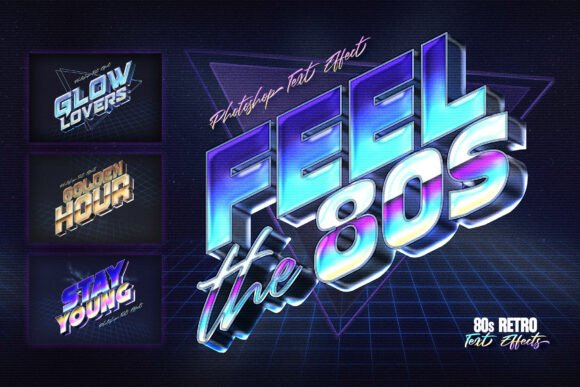
If you’ve ever wanted to bottle the feeling of a neon-drenched arcade, a VHS rental store, or the opening credits of an 80s action movie, the 80s Retro Nostalgia Text Effects toolkit is your shortcut. This isn’t just a display font; it’s a professional-grade Photoshop asset that applies a complete visual treatment to your typography. Think of it as a time machine for your letters. The effect delivers that unmistakable Retrowave aesthetic: sharp, chrome-like extrusions that catch the light, vibrant neon glows that look laser-cut, and those iconic sunset gradients—vibrant pinks, oranges, and purples blending into a dark horizon. It’s the style that defined album covers, movie posters, and the entire vibe of a decade. The personality here is bold, energetic, and unapologetically nostalgic, designed to grab attention and evoke a specific, powerful emotion in anyone who remembers—or idealizes—that era.
What makes this a premium font asset is its layer-based approach. Delivered as a set of high-resolution PSD files with Smart Objects, it’s built for flexibility and quality. You’re not stuck with a static look. The layered structure means you can often tweak the glow intensity, adjust the gradient colors, or modify the extrusion depth to fit your specific project. This level of control separates it from a simple, one-click text effect and gives you the tools to create something that feels both authentic and custom. The included PDF with font links and instructions is a practical touch, ensuring you can get the exact typeface the effect was designed to complement, maintaining that authentic 80s typography feel from the start.
Where This 80s Style Truly Shines
The applications for the 80s Retro Nostalgia Text Effects are surprisingly broad, extending far beyond simple retro projects. Its core strength lies in any context where you want to make an immediate, high-impact statement. For synthwave and retrowave music producers, this is almost essential. It’s perfect for designing album artwork that feels like it belongs in a curated Spotify playlist, or for creating artist logos that pulse with that same neon energy found in the music itself. The effect translates beautifully to logo design for bands, podcasts, or YouTube channels dedicated to the genre.
Beyond music, consider its power in editorial design and web design. Imagine a blog header for a post about 80s cinema, or a featured image for an article on retro gaming history. This effect instantly telegraphs the subject matter. For social media graphics, especially on platforms like Instagram or TikTok, it’s a stop-scroller. A thumbnail for a video essay on John Carpenter’s films or a “Top 10 Arcade Games” list using this style will stand out in a crowded feed. It’s also a fantastic tool for event posters—think themed club nights, retro gaming tournaments, or film screenings. The style communicates the event’s theme before a single word is read, setting the right expectations and building excitement.
For entrepreneurs and creators in the apparel and streetwear space, this is a powerful design asset. The visual language of the 80s has a timeless appeal in fashion. Using this effect to create t-shirt designs, hoodie graphics, or even packaging design for a niche product (like a special edition energy drink or a retro candy bar) can tap into a lucrative market of nostalgia buyers. The key is that it’s not just a creative font style; it’s a complete brand identity shorthand. It instantly communicates a specific aesthetic and vibe, which is invaluable for building recognition.
Integrating the Effect: A Practical Guide
When you download the 80s Retro Nostalgia Text Effects, you’re getting four high-quality PSD files. The dimensions are generous—3000 x 2000 pixels at 300 DPI—making them suitable for both digital and print projects without loss of quality. The first step is to open one in Adobe Photoshop CC. The layered structure is your playground. You’ll typically find a Smart Object layer at the top; double-clicking this opens a new window where you can type your own text or place your logo. Save that window, and the effect automatically applies to your design.
A critical part of using any display font or effect is font pairing. The included PDF will guide you to typefaces that work harmoniously with the 80s aesthetic, but don’t be afraid to experiment. For body text or supporting information, you’ll want a clean, highly readable sans serif font or even a simple serif font. The contrast is key. Your main headline, powered by the 80s effect, is the star. It should be used sparingly for maximum impact—think hero sections, main titles, or key call-to-action phrases. The supporting text should be quiet, providing information without competing for attention.
Readability is a consideration with any stylized typeface. This effect is best used for short, powerful words or phrases—band names, event titles, product names, section headers. It’s not designed for paragraph text. Test it at the size you intend to use. The glow and extrusion should enhance legibility, not obscure it. If the text becomes hard to read at a smaller scale, simplify or use the effect only on the most important word.
Finally, always check the licensing for any commercial font or asset. The included documentation should clarify the terms for using the 80s Retro Nostalgia Text Effects in commercial projects, like merchandise for sale or client work. Understanding this ensures you can use this powerful tool confidently and professionally, building a consistent and recognizable visual language for your brand or project that truly feels the 80s.